---
title: Is there a product comparison feature on your website?
description: "This article provides answers to the question: 'Is there a product comparison feature on your website?', helping users understand and navigate this feature on the SLS e-shop."
---
[Skip to content](https://faq.slsbearings.com/en/shop/product-comparison-feature#main-content)
English
Show submenu for translations
![logo-sls-en.png\]](https://faq.slsbearings.com/hs-fs/hubfs/SLSBearings_July2019/Image/logo-sls-en.png?width=300&height=38&name=logo-sls-en.png)
- [Home](https://shop.slsbearings.com/sg/)
- [About Us](https://www.slsbearings.com/)
- [Contact Us](https://shop.slsbearings.com/sg/contact/)
- [SLS Blog](http://slsbearings-com-sg-2289490.hs-sites.com/blog)
Open main navigation
Close main navigation
- [Home](https://shop.slsbearings.com/sg/)
- [About Us](https://www.slsbearings.com/)
- [Contact Us](https://shop.slsbearings.com/sg/contact/)
- [SLS Blog](http://slsbearings-com-sg-2289490.hs-sites.com/blog)
- English
Show submenu for translations
Welcome to SLS e-shop FAQ page. How can we help you?
- There are no suggestions because the search field is empty.
1. [SLS e-shop FAQ](https://faq.slsbearings.com/en/shop?hsLang=en)
2. [Product Information and Availability](https://faq.slsbearings.com/en/shop/product-information-and-availability?hsLang=en)
# Is there a product comparison feature on your website?
## Yes, but currently the comparison feature only supports price comparison.
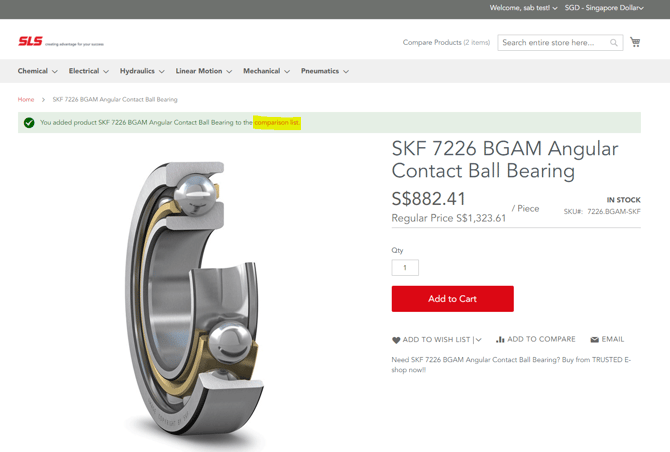
Products can be added to *Add to Compare* from the product listing or from the product details page.
***Method 1: Product Listing Page***
1. Point to the product to display the options.
2. Find the products that you want to compare and click the  button for each.
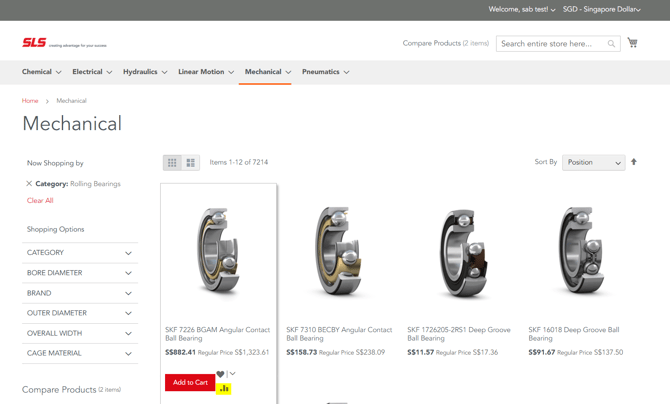
3. Click on the link provided in the display message to view the product comparison page.
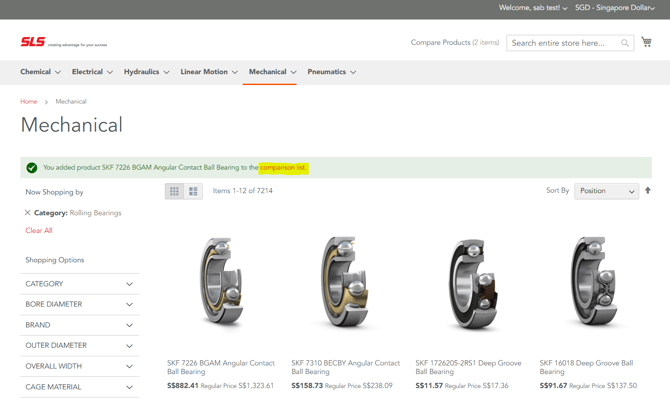
***Method 2: Product Details Page***
1. Click the  **Add to Compare** button.
2. Click on the link provided in the display message to view the product comparison page.
#### Product Comparison Page
1. To print the comparison information, click **Print This Page**.
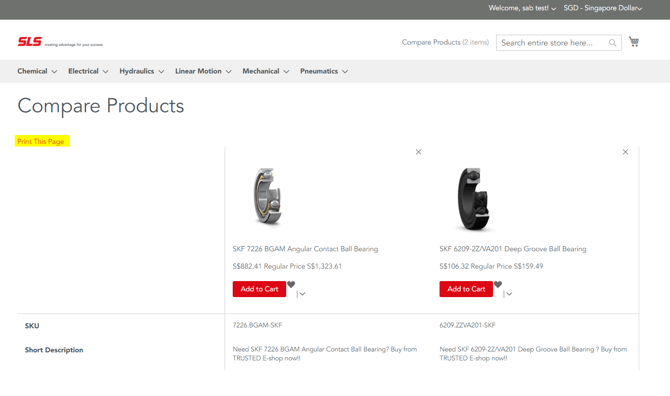
2. To remove a single product from the comparison page, click **Delete** ().
If you need help comparing product specifications or features, feel free to contact our customer support team:
📧 Email: [ecomcs.sg@slsbearings.com.sg](mailto:ecomcs.sg@slsbearings.com.sg)
💬 Or [click here](https://shop.slsbearings.com/sg/) to visit our main page and access live chat
- [Account and Registration](https://faq.slsbearings.com/en/shop/account-and-registration?hsLang=en)
- [Ordering](https://faq.slsbearings.com/en/shop/ordering?hsLang=en)
- [Product Information and Availability](https://faq.slsbearings.com/en/shop/product-information-and-availability?hsLang=en)
- [Bulk Orders and Wholesale](https://faq.slsbearings.com/en/shop/bulk-orders-and-wholesale?hsLang=en)
- [Payment and Billing](https://faq.slsbearings.com/en/shop/payment-and-billing?hsLang=en)
- [Shipping and Delivery](https://faq.slsbearings.com/en/shop/shipping-and-delivery?hsLang=en)
- [Exchanges, Returns and Refunds](https://faq.slsbearings.com/en/shop/exchanges-returns-and-refunds?hsLang=en)
- [Promotions and Discounts](https://faq.slsbearings.com/en/shop/promotions-and-discounts?hsLang=en)
- [Warranty and Product Support](https://faq.slsbearings.com/en/shop/warranty-and-product-support?hsLang=en)
- [Privacy & Security](https://faq.slsbearings.com/en/shop/privacy-security?hsLang=en)
- [Customer Support](https://faq.slsbearings.com/en/shop/customer-support?hsLang=en)
- [Community, Newsletter and Engagement](https://faq.slsbearings.com/en/shop/community-newsletter-and-engagement?hsLang=en)
[](https://www.slsbearings.com/?hsLang=en)
SLS e-shop FAQ page
Copyright © 2025, SLS Group of Companies